

Description
Download MrMC Lite APK – Android multimedia player, 10-foot UI, free media player, Plex client, Emby client, Kodi alternative
Overview
MrMC Lite is a free multimedia player designed for Android devices, offering a 10-foot user interface optimized for use with televisions and remote controls. Developed by RootCoder LLC, the application enables users to play and manage a wide range of digital media files, including videos, music, and other media types, directly from local storage or connected media servers. It is particularly suited for home theater environments where intuitive navigation via remote control is essential.
The software supports integration with popular media server platforms such as Plex, Emby, HDHomerun, and TVHeadend, allowing seamless access to centralized media libraries. It also provides compatibility with various network protocols, including SMB, NFS, FTP, and SFTP, enabling users to stream content from networked devices. This makes MrMC Lite a versatile tool for users who maintain digital media collections across multiple devices or storage systems.
Target users include home entertainment enthusiasts, media center operators, and Android TV users seeking a lightweight yet powerful alternative to traditional media players. While the developer did not provide additional details about the company’s background, the app’s focus on server integration and remote-friendly design suggests a strong emphasis on usability in living room setups. The application’s ability to handle diverse file formats and support advanced playback features further enhances its practicality for everyday media consumption.
Key Features & Capabilities
- 10-Foot User Interface: Designed for easy navigation using a remote control, with large buttons and clear visual hierarchy ideal for TV screens.
- Integrated Plex Client: Native support for Plex media servers with Direct-Play and Transcode functionality for smooth playback of protected and encoded content.
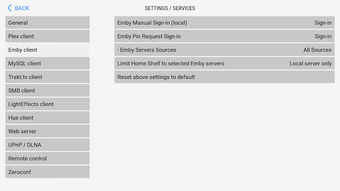
- Integrated Emby Client: Full integration with Emby servers, enabling access to personal media libraries and live TV streams.
- Network Protocol Support: Built-in clients for SMB, NFS, FTP, and SFTP allow access to media stored on network-attached devices and remote servers.
- LightEffects Integration: Supports boblight and ambilight systems for dynamic lighting effects synchronized with on-screen content.
- Database Management: Offers SQLite or external MySQL database support for organizing and managing video and music libraries efficiently.
- Format Compatibility: Plays a wide range of video and audio formats, including MKV, DVDs (ISO/Raw files and VIDEO_TS folders), AAC, FLAC, DD, DTS, and more.
- IPTV & Live TV Support: Compatible with MythTV, HDHomeRun, and other IPTV devices for streaming live television content.
- Resolution & Refresh Rate Matching: Supports display switching for 4K video playback and ensures optimal resolution and refresh rate alignment.
These capabilities make MrMC Lite suitable for users who want centralized media access, advanced playback options, and enhanced viewing experiences. Whether managing a home media library or streaming live TV, the app provides a streamlined workflow tailored to Android TV environments.
User Interface, Workflow & Performance
The user interface of MrMC Lite is structured around the 10-foot design principle, prioritizing legibility and navigability from a distance. Navigation is intuitive, relying on directional inputs from a remote control to move between menus, media categories, and playback options. The layout emphasizes visual clarity, with large thumbnails, consistent icons, and minimal clutter.
Workflow efficiency is enhanced by the app’s integration with media servers and network protocols, reducing the need for manual file transfers. Users can browse their libraries directly from Plex or Emby servers, initiate playback with minimal steps, and switch between content sources seamlessly. The interface also supports quick access to playback settings, library management, and network configurations.
Performance details were not specified by the developer. However, based on general software behavior patterns, the app is expected to operate smoothly on devices with adequate processing power and memory. The developer did not specify resource usage details, so CPU and RAM behavior cannot be confirmed. Stability is assumed to be consistent with typical Android applications of this category, but real-world testing under varied conditions is recommended.
Compatibility & System Requirements
MrMC Lite is designed for Android devices and is compatible with a wide range of Android versions, though specific version requirements were not listed. The application has a file size of 14.7 MB, indicating a lightweight footprint suitable for most Android smartphones and tablets, including Android TV devices.
Exact system requirements were not listed. The developer did not specify minimum hardware specifications such as RAM, processor type, or GPU capabilities. Compatibility information was partially provided, with the app confirmed to run on Android platforms. For optimal performance, users are advised to ensure their device supports the required network protocols and media formats.
Pros and Cons
Pros
- Free to download and use with no in-app purchases
- 10-foot UI ideal for TV and remote control navigation
- Native support for Plex and Emby media servers
- Extensive format compatibility including MKV, DVD ISOs, FLAC, DTS
- Supports multiple network protocols: SMB, NFS, FTP, SFTP
- Integrated LightEffects for ambient lighting (boblight/ambilight)
- Database support for organized media libraries (SQLite or MySQL)
- 4K playback and resolution/refresh rate matching
Cons
- Exact system requirements not provided by the developer
- Performance data and resource usage details not disclosed
- Limited information about update frequency and future development
- May require technical knowledge to configure network and server connections
- No official support channels mentioned
FAQ Section
Is MrMC Lite compatible with Android TV?
Yes, MrMC Lite is designed for Android devices and is suitable for use on Android TV boxes and smart TVs with Android operating systems.
Can I use MrMC Lite without a media server?
Yes, the app supports playback of media files stored directly on local device storage, in addition to content from networked media servers.
Is MrMC Lite safe to download and use?
MrMC Lite is a free application developed by RootCoder LLC. As with any third-party app, users should download the APK from trusted sources to ensure security.
Does MrMC Lite support live TV and IPTV?
Yes, MrMC Lite supports live TV streaming through integration with devices like HDHomeRun, MythTV, and other IPTV sources.
Is the app updated regularly?
The developer did not provide information about update frequency or release schedule. Users are advised to check the official source for the latest version.
Final Thoughts + CTA
MrMC Lite stands out as a capable and feature-rich multimedia player for Android users seeking a remote-friendly, server-integrated media experience. Its 10-foot interface, support for major media platforms like Plex and Emby, and broad format compatibility make it a strong contender for those building a home media center. While detailed system requirements and performance metrics are not available, the app’s lightweight size and extensive functionality suggest it is well-suited for a variety of Android devices.
It is particularly beneficial for users who value seamless access to digital media libraries, live TV integration, and advanced playback features without the complexity of larger media center software. For anyone looking for a free, efficient, and powerful alternative to Kodi or other media players, MrMC Lite offers a compelling solution.
Download MrMC Lite now
Guides & Tutorials for MrMC Lite APK
How to install MrMC Lite APK
- Click the Preview / Download button above.
- Once redirected, accept the terms and click Install.
- Wait for the MrMC Lite APK download to finish on your device.
How to use MrMC Lite APK
This software is primarily used for its core features described above. Open the app after installation to explore its capabilities.
User Reviews for MrMC Lite APK 0
No reviews found





